Workplace design is increasingly shaped by employee health and comfort. As organisations place greater focus on ergonomics and well-being, traditional desk setups are being re-evaluated. Prolonged sitting has become a common concern, often linked to reduced movement and discomfort during long working hours.
To address this, many companies are adopting more flexible workstation solutions that encourage posture variation throughout the day. Sit-stand workstations offer a practical way to alternate between sitting and standing, supporting natural movement during work. However, simply installing them is not enough. Proper setup and thoughtful implementation are essential to ensure employees experience their full benefits.
What Is a Sit-Stand Desk and How Does It Work?
Sit-stand workstations are adjustable desks that allow users to switch between sitting and standing positions while working. They are designed to support movement and flexibility in modern office environments.
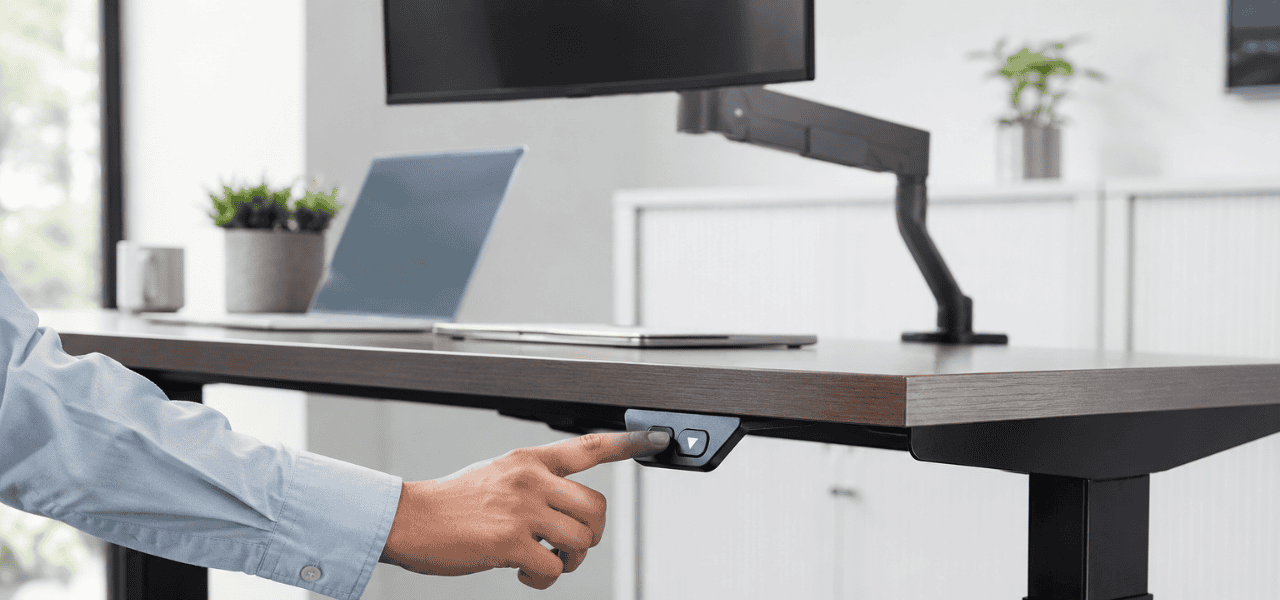
These systems typically operate through manual or electric mechanisms. Manual versions use a crank or lever, while electric models allow smooth height adjustment with the push of a button.
They are commonly used in corporate offices, co-working spaces, and hybrid work setups. Sit-stand desks also align well with modern workplace design, where flexibility and employee comfort are key priorities, often complemented by solutions such as a workstation partition system that helps define structured yet adaptable work areas.
What Are the Health and Productivity Benefits of Sit-Stand Workstations?
Sit-stand workstations support better movement and posture during the workday. They are not meant to eliminate sitting but to create a healthier balance between sitting and standing. Following are the key benefits:
- Reduced Sedentary Time: Encourages regular movement during working hours rather than long uninterrupted sitting periods.
- Better Posture Support: Helps users maintain more natural alignment while switching positions.
- Reduced Physical Strain: May help ease discomfort in the neck, shoulders, and lower back when used correctly.
- Improved Energy Levels: Movement during the day can support better alertness and comfort.
- Enhanced Workplace Engagement: Employees often feel more active and focused with flexible work setups. Overall, sit-stand workstations are most effective when used as part of a balanced routine rather than continuous standing.
How Should Ergonomic Standing Desks Be Set Up Correctly?
Proper setup is essential to gain the full ergonomic benefits of sit-stand workstations. Small adjustments can significantly improve comfort and reduce strain during use. Before setting up the workstation, here are the key ergonomic guidelines:
- Desk Height (Sitting): Elbows should remain at a 90-degree angle with feet flat on the floor.
- Desk Height (Standing): The surface should align with elbow level to avoid shoulder strain.
- Monitor Positioning: The Screen should be at eye level, about an arm’s length away.
- Keyboard & Mouse Placement: Keep them close to prevent overreaching and wrist strain.
- Posture Alignment: Maintain relaxed shoulders and a neutral spine in both positions.
- Movement Habit: Alternate between sitting and standing instead of staying in one position too long. Each setup should be adjusted based on individual height, comfort, and daily usage patterns.
Maintaining proper seating ergonomics is equally important. An office chair adjustment guide can help users understand how knobs, hydraulics, and recline features support better posture alongside sit-stand workstation use.
What Are the Best Practices for Introducing Sit-Stand Workstations in the Workplace?
Successful adoption of sit-stand workstations depends on gradual implementation and employee awareness rather than immediate full-day standing use. Before rolling them out widely, consider these practices:
- Gradual Transition: Encourage short standing intervals instead of prolonged standing hours.
- Position Alternation: Promote regular switching between sitting and standing throughout the day.
- Ergonomic Training: Help employees understand correct usage and posture guidelines.
- Wellness Integration: Include sit-stand usage in broader workplace wellness initiatives.
- Workspace Planning: Ensure layout and space support smooth movement and accessibility, especially when integrating modular workstation desking for offices, which helps create flexible and scalable work environments.
- Usage Monitoring: Gather feedback to improve comfort and workstation effectiveness.
This approach is especially important in addressing issues linked to a sedentary lifestyle in modern office environments.
Want a healthier and more productive workspace?
Vlite Furnitech LLP delivers ergonomic sit-stand workstations tailored to your office needs.
What Should Businesses Consider When Choosing a Height-Adjustable Workstation?
Selecting the right workstation involves evaluating both functionality and long-term usability. Before making a decision, businesses should assess the following:
- Adjustment Range: Should suit different user heights and working positions.
- Stability & Strength: Must remain steady in both sitting and standing positions.
- Ease of Use: Simple adjustment mechanisms encourage regular usage.
- Space Efficiency: Should fit well within existing office layouts.
- Material Quality: Durable construction ensures long-term reliability.
- Maintenance Needs: Low-maintenance designs reduce operational effort.
- Compatibility: Should integrate easily with existing office furniture systems.
Conclusion
Sit-stand workstations play an important role in creating healthier, more flexible, and employee-friendly workplaces. When used correctly, they support better posture, improved movement, and enhanced day-to-day comfort. However, proper ergonomic setup and thoughtful implementation are essential to unlock their full benefits.
As organisations upgrade their work environments, choosing well-designed workstation solutions can contribute to long-term workplace efficiency and employee well-being. To learn more about thoughtfully designed workplace furniture solutions, explore offerings from Vlite Furnitech, a trusted and experienced office furniture manufacturer. For expert guidance on ergonomic office planning, contact us to discuss your requirements.
Looking to upgrade your office ergonomics?
Choose Vlite Furnitech LLP for premium sit-stand workstations that enhance comfort and efficiency.
FAQs
1. Is standing all day better than sitting all day?
No, standing all day is not better; the ideal approach is to alternate between sitting and standing to avoid strain and reduce prolonged static posture in either position.
2. What is the ideal sit-stand ratio during the workday?
A balanced approach like 1:1 or 2:1 (sitting to standing) is commonly recommended, with regular position changes every 30–60 minutes.
3. How long does it take to adjust to a sit-stand workstation?
Most people take a few days to a couple of weeks to adapt, depending on their comfort level and how gradually they introduce standing time.
4. What accessories can improve a sit-stand workstation setup?
Ergonomic accessories like anti-fatigue mats, monitor arms, keyboard trays, and footrests can significantly improve comfort and posture support.
5. How do I choose the right sit-stand workstation for my office?
Focus on adjustability, stability, workspace fit, and build quality, ensuring it suits user height ranges and integrates well with existing office layouts.

Vishnu Sharma
I am the co-founder and CEO of Vlite Furnitech, creating modular office solutions since 2009. With a background in Chemistry and Marketing, and experience as Regional Head at Featherlite, I help design ergonomic, adaptable, and sustainable workspaces. Alongside a team of 120+, we serve corporates like JCB, Just Dial, KFC, and educational institutions. Let’s connect to reimagine innovative, eco-friendly office environments.